
YouCine Channels List 2026: What Is Actually in the Live TV Section
If you have landed here looking for Youcine Channels list — a fixed, numbered list of every channel inside YouCine — the honest answer is that no such list exists — not on this site, not on any other, and not from the developer either.
That is not us dodging the question. It is the single most useful thing you can know before you install the app, because it explains why the channel line-up you see will not match the line-up your friend sees, and why a channel that worked last week may not work today.
What follows is what the Live TV section actually contains, how availability changes by country, how to search it yourself in about thirty seconds, and what to do when a channel you want is not there.
Quick answer
YouCine has no official or published channel list. It is a stream aggregator, not a broadcaster -it pulls live feeds from third-party sources that rotate constantly. The Live TV section is organised into categories (news, sport, entertainment, kids, regional) rather than a fixed channel grid, and what appears in each category depends on your region and on which sources are online at that moment. The only reliable way to know if a specific channel is available to you is to open the app and search for it.
Why There Is No Official YouCine Channels List
Three reasons, and understanding them will save you a lot of frustration later.
YouCine does not own or host any channels
This is the part most guides skip. YouCine APK is an aggregator – it collects publicly reachable stream links from third-party sources and presents them in one interface. It does not run a headend, it does not license feeds, and it has no contractual relationship with any broadcaster.
That means it cannot publish a channel list in the way a legitimate service can, because it does not control what is on the other end of any given link. A broadcaster or the source itself can pull a feed at any time, without notice, and there is nothing the app can do about it.
The source pool changes constantly
Stream sources go offline, get replaced, change URLs and come back under different names. A list published today would be partly wrong within a fortnight. Any site showing you a tidy table of two hundred channel names has either copied it from somewhere else or invented it – in both cases it is describing something that no longer matches the app.
What you see depends on where you are
The app surfaces different regional groupings depending on the IP address it sees. A user in Brazil, a user in South Africa and a user in the UK will open the same version of the app and find three noticeably different Live TV sections. This is why “youcine channels list” has no single correct answer.
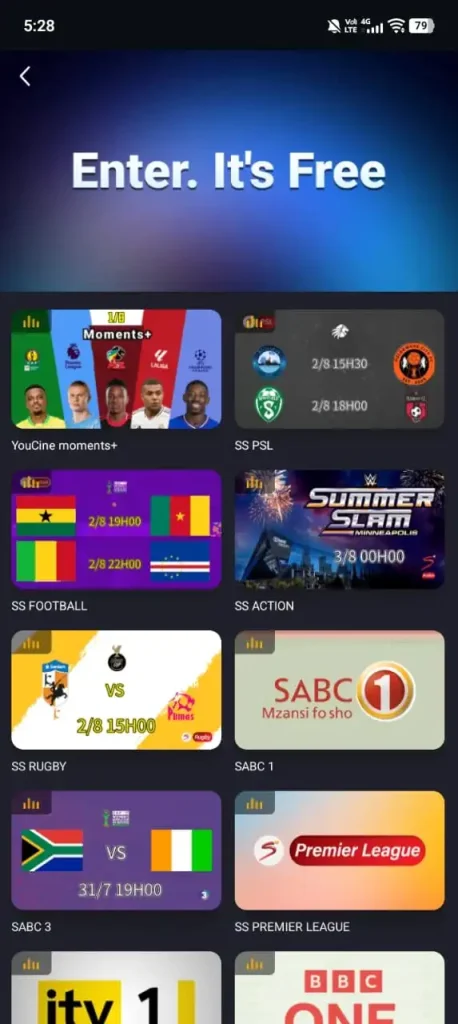
What the YouCine Channels List Actually Contains
Rather than a channel list, think of it as a set of category rows. These are the groupings that appear consistently across builds:
|
Category |
What is typically in it |
How stable is it? |
|
News |
International and regional rolling-news feeds |
Fairly stable — news feeds are often openly streamed |
|
Sport |
Match feeds and sports-dedicated channels |
Highly volatile — heaviest demand, quickest to drop |
|
Entertainment |
General-entertainment and drama channels |
Mixed |
|
Movies |
Film-focused channels running scheduled programming |
Mixed |
|
Kids |
Cartoon and children’s programming |
Fairly stable |
|
Music |
Music video and concert channels |
Fairly stable |
|
Regional |
Grouped by country or language, varies by your location |
Depends entirely on region |
|
Religious |
Faith broadcasting, often openly streamed |
Stable |
The pattern in that right-hand column is worth noticing. Channels that broadcasters stream openly on their own websites tend to be reliable inside the app. Channels that sit behind a paid subscription are the ones that vanish, buffer, or die mid-programme – because the source serving them was not meant to be serving them.
If your reason for installing is one specific pay-TV sports channel, set your expectations accordingly. That is the category with the highest failure rate, and it is the category people are most disappointed by.
YouCine Channels in South Africa
South Africa is one of the most common regions this question comes from, so it is worth addressing directly.
Users connecting from a South African IP typically see a regional grouping alongside the international categories. What appears in it depends on which sources are reachable at the time — and in practice South African users report a thinner regional line-up than Brazilian or European users, because the source pool for this region is smaller.
There is also a practical point that catches people out: if you use a VPN, you will not see the South African grouping at all. The app decides what to show based on the IP address, so a VPN set to another country replaces your regional row with that country’s. If your local channels disappear after you turn on a VPN, that is why.
Legitimate live TV options in South Africa
This is worth knowing whether or not you use YouCine, because these work permanently and they do not stop mid-match:
- SABC+ – the SABC’s own streaming service, carrying its television channels and radio stations. Free to use with registration.
- Openview – free-to-air satellite. One-off installation cost, no monthly subscription, and a genuine channel line-up you can rely on.
- eVOD – eMedia’s free ad-supported streaming platform.
- DStv Stream and Showmax – paid, but these are where the premium sport and series actually live, legitimately.
How to Check the YouCine Channel List Yourself
Thirty seconds, and it gives you the actual answer for your device and your location rather than a guess:
- Open the app and select the Live TV tab from the bottom navigation.
- Let the category rows finish loading. On a slow connection this takes a few seconds and an empty screen at this stage does not mean the section is empty.
- Use the search icon and type the channel name you are looking for. Try both the full name and a shortened version – sources label channels inconsistently, so “Sport 1” and “Sports HD 1” may be the same feed.
- Tap the result to test it. A channel appearing in the list is not the same as a channel that plays. Always test before you decide the app does what you need.
- If it plays, add it to favourites. Favourites persist across sessions and save you re-searching every time.
Why a Channel Disappears or Will Not Play
Four causes, in the order you should check them:
|
What you see |
Most likely cause |
What to do |
|
Channel is in the list but shows a loading spinner forever |
The source is offline |
Try a different entry for the same channel — there are often several |
|
Channel played yesterday, gone today |
Source was pulled or rotated out |
Nothing you can do in-app. It may reappear. |
|
Regional channels vanished |
VPN is changing your apparent location |
Turn the VPN off and reload the Live TV tab |
|
Everything buffers constantly |
Connection speed, or an overloaded source |
Drop the quality setting first; test your speed second |
|
Live TV tab is empty entirely |
App or cache problem, not a channel problem |
Clear the app cache, then reinstall the current build |
One thing worth saying plainly: constant buffering on live sport is not usually a fault you can fix. It is a symptom of many people pulling from one unofficial source at the same moment. No setting change on your phone solves that.
Is the Channel List Bigger on Smart TV or Fire Stick?
No. The Live TV section is served from the same sources regardless of which device runs the app, so the line-up is identical on a phone, an Android TV box or a Fire Stick.
What does change is the experience. Live TV is far easier to navigate on a big screen with a remote than by scrolling on a phone, and channel switching is quicker. If you are mainly using the app for live TV rather than on-demand content, a TV install is worth the setup time.
Before You Rely on This for Anything Important
A straight assessment, because you should have it before match day.
Reliability: unofficial live sources fail most often at exactly the moment demand peaks. If you are planning to watch a specific fixture at a specific time, do not make this your only plan. That is the most common complaint about every app in this category, and it is a structural problem rather than a bug.
Legality: where a stream carries content the source has no right to distribute, watching it is copyright infringement in most countries – including South Africa, the UK, the US, Germany, India and Brazil – regardless of the fact that you did not download anything. Enforcement varies; the law does not vary as much as people assume.
Quality: openly broadcast channels generally stream cleanly. Premium channels routed through unofficial sources are where the buffering, the sudden drops and the mid-match failures happen.